
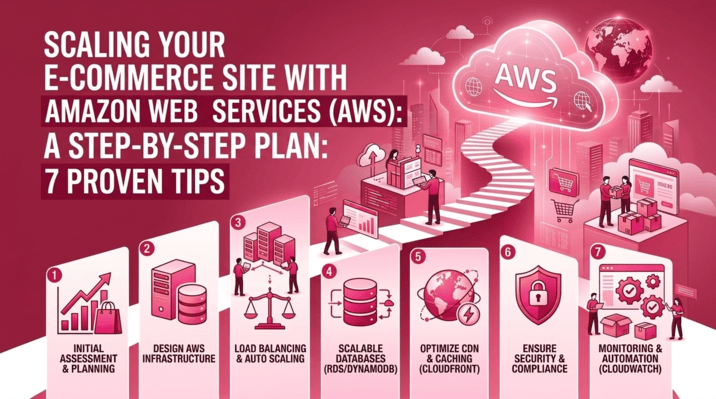
The e-commerce landscape is fierce. Success often brings a unique and challenging problem: traffic spikes. A successful flash sale or a feature in a major publication can turn your thriving storefront into a digital bottleneck. For many e-commerce business owners, traditional hosting becomes a liability during these crucial moments.
If your infrastructure cannot handle the surge, pages load slowly, checkout processes hang, and frustrated customers abandon their carts—sometimes forever. Scaling isn’t just about handling more traffic; it’s about maintaining a seamless, reliable experience regardless of the load.
This is where Amazon Web Services (AWS) shines. AWS provides the global infrastructure, elasticity, and set of managed services required to transform a growing e-commerce site into an enterprise-grade powerhouse.
This guide provides a definitive, step-by-step roadmap to scaling your e-commerce site using AWS, covering everything from initial assessment to ongoing optimization. We will integrate 7 proven tips into a actionable plan, giving you everything you need in one place. 🚀
🖼️ Visualizing the Target Architecture
Before we begin the steps, let’s visualize what a highly scalable, resilient e-commerce architecture on AWS looks like. This diagram represents the destination for your migration or optimization journey.
Part 1: The Assessment Phase 🔍
You cannot scale effectively if you don’t know where you are starting.
Step 1: Baseline Performance Metrics
Start by defining your current operational baseline. Use your current hosting analytics or tools like Google Analytics to understand:
-
Average and peak concurrent users.
-
Average page load times (critical for e-commerce SEO and conversion).
-
Database CPU/Memory utilization during normal and peak periods.
-
Bandwidth usage.
Step 2: Choose Your Region Wisely
AWS has infrastructure all over the globe. Tip 1: Select an AWS Region closest to your primary customer base. This minimizes latency (ping time) for your shoppers, resulting in a faster, snappier website. For redundancy, you can later expand into multiple regions, but start strong locally.
🔗 Actionable Link: Review the full list of AWS Global Infrastructure Regions.
Part 2: Step-by-Step Scaling Roadmap
With your assessment complete, we will follow a logical path to build a highly available, scalable infrastructure.
Phase 1: Moving Beyond Single Servers (The “Always-Up” Architecture)
The traditional hosting model relies on a single massive server. This is a Single Point of Failure (SPOF). We must architect for resilience.
Step 3: Embrace Horizontal Scaling and Auto Scaling ⚖️
Vertical scaling (upgrading a server’s RAM/CPU) is limited and requires downtime. Tip 2: Use Horizontal Scaling (Scaling Out) with AWS Auto Scaling. This means adding more instances of the same size during high load, rather than upgrading one server.
AWS Service: Use Amazon EC2 Auto Scaling groups to automatically launch or terminate EC2 instances based on conditions you define (e.g., CPU utilization > 70%).
Step 4: Distribute Traffic with Load Balancing
To support multiple servers, you need a way to distribute incoming traffic.
AWS Service: Deploy an Elastic Load Balancer (ELB). ELB sits in front of your Auto Scaling group, accepts user requests, and intelligently directs them to healthy EC2 instances across multiple Availability Zones (AZs).
Step 5: Implement Multi-Availability Zone (Multi-AZ) Redundancy
An Availability Zone is one or more distinct data centers with redundant power, networking, and connectivity within an AWS Region. Tip 3: Always deploy your critical infrastructure across at least two Availability Zones. If one data center has an outage, the load balancer automatically shifts all traffic to the healthy instances in the other AZ, ensuring zero downtime.
Phase 2: Optimizing Database and Assets (The Speed Phase)
Your application servers are now resilient. The next bottleneck is often the database and delivering heavy assets (images).
Step 6: Decouple Your Database and Scale 🗄️
Running your application and database on the same server is a recipe for disaster under load. Moving the database to a dedicated, managed service is mandatory.
-
AWS Service: Migrate your database (MySQL, PostgreSQL, etc.) to Amazon RDS (Relational Database Service).
-
Tip 4: Use RDS Read Replicas for Database Read Performance. E-commerce sites are typically “read-heavy” (customers browsing products). Creating RDS Read Replicas allows your main (Writer) instance to handle transactions, while additional instances (Readers) serve product search and browsing traffic, dramatically improving speed.
-
Activate Multi-AZ RDS for automatic database failover.
-
Step 7: Offload Static Content with a Content Delivery Network (CDN) 🌍
E-commerce sites rely heavily on high-quality images and product videos. Serving these from your application servers wastes precious CPU and bandwidth. Tip 5: Move all static assets (images, CSS, JS) to Amazon S3 and serve them globally via Amazon CloudFront (CDN).
-
This offloads traffic from your web servers, drastically improves page load times for global users, and reduces your costs.
🔗 Actionable Link: Get started with Amazon S3 (Simple Storage Service).
Phase 3: The Growth and Maturity Phase (Enterprise-Ready)
Your infrastructure is now highly available and optimized for speed. This phase focuses on automation, cost control, and advanced performance.
Step 8: Implement Caching 🚀
Caching stores frequently accessed data in memory, allowing for retrieval in milliseconds. Tip 6: Implement Caching at Every Layer.
-
Page Caching (CDN): CloudFront caches images/HTML.
-
Database Caching: Use Amazon ElastiCache (Memcached or Redis) to store the results of complex database queries (e.g., your homepage product grid) and session data. This prevents the database from being overwhelmed.
Step 9: Adopt Serverless Where Practical ⚡
You can remove entire layers of server management by adopting “Serverless” architecture. Tip 7: Use AWS Lambda for Background or Bursty Tasks.
-
Use Lambda functions to automatically process image uploads (resizing product photos upon upload), send order confirmation emails via Amazon SES, or handle third-party API integrations, all without managing a single server. You only pay for the exact compute time used.
Part 3: Essential Supporting Components for E-commerce 🛡️💰
Your architecture isn’t complete without security and monitoring.
🛡️ Security First
Security is a non-negotiable requirement for e-commerce, especially regarding customer data and payments.
-
AWS WAF (Web Application Firewall): Protect your storefront from common web exploits (SQL injection, XSS) and bot traffic during flash sales.
-
AWS Certificate Manager (ACM): Provision and manage SSL certificates easily to ensure every page on your site is delivered securely via HTTPS.
-
Compliance: AWS infrastructure is compliant with PCI DSS Level 1, the strict standard required for handling credit card payments. You still need to manage application-level compliance, but the foundation is secure.
💰 Monitoring and Cost Optimization
Scaling quickly can become expensive if not managed properly.
-
Amazon CloudWatch: Monitor your infrastructure in real-time. Set up alarms on critical metrics (e.g., ELB error counts, EC2 CPU usage) to automatically trigger scaling actions or notify your team.
-
AWS Cost Explorer: Visualize and understand your spending patterns. Use tagging strategies to track costs for specific promotions or environments. Use Compute Savings Plans or Reserved Instances for steady-state workloads to significantly reduce long-term costs.
🏁 Everything You Need in One Place
Scaling your e-commerce site is a structured process that moves from fragility to agility. AWS provides the tools, but your strategy dictates the success.
By following this step-by-step roadmap and integrating the 7 proven tips, you aren’t just preparing for a successful holiday season; you are building a platform that can support your business ambition indefinitely.
| Priority | Strategy | Key AWS Service | Impact for E-commerce |
| High | Multi-AZ Deployment | EC2, ELB, RDS | Zero downtime during outages. |
| High | Auto Scaling | EC2 Auto Scaling | Handles sudden traffic spikes automatically. |
| High | Decouple Database | Amazon RDS | Critical for performance and reliability. |
| High | Asset Offloading | Amazon S3 + CloudFront | Faster load times, better conversion, lower server load. |
| Med | Caching | Amazon ElastiCache | Sub-millisecond data retrieval; unburdens the database. |
| Med | Security | AWS WAF | Protects customer data and site availability. |
| Opt. | Serverless Integration | AWS Lambda | Reduces operational overhead for background tasks. |
Your journey to a robust, enterprise-grade e-commerce platform starts today. Implement Step 1 and 2, select your region, and begin building the resilient future of your business. 🚀