The cloud promises scalability, speed, and innovation. It also has an uncomfortable tendency to promise a much larger bill than you expected. Amazon Web Services (AWS) offers unparalleled power, but its pay-as-you-go model, while flexible, is a double-edged sword.
In 2026, managing cloud spend is not just a standard IT function; it is a critical requirement for business profitability. According to recent industry surveys, nearly 35% of cloud spend is wasted through inefficiencies. That waste is your opportunity.
Welcome to your definitive guide on AWS Cost Optimization. We won’t just list theoretical concepts; we are diving deep into 7 proven, actionable tips to visualize, manage, and drastically reduce your AWS bill without sacrificing performance. Everything you need is right here.
The Core Concept: Visibility is Power 🔎
Before we optimize, we must understand. You cannot manage what you cannot see. AWS costs are complex, generated by thousands of micro-transactions across hundreds of services. The foundation of optimization is a robust visibility strategy.
You need to know:
-
Which team or project is generating cost.
-
Which specific resources are the most expensive.
-
Are these resources actually being used?
We’ll cover these visibility steps first, as they enable the 7 proven tips that follow.

Top 7 Proven Tips for AWS Cost Optimization
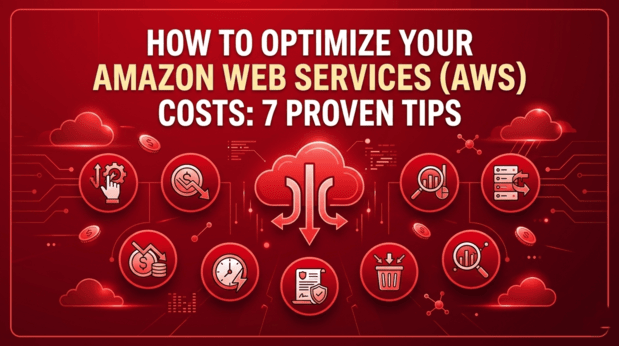
This infographic summarizes the seven pillars of successful AWS FinOps (Financial Operations) that we will explore in detail below. By implementing these strategies sequentially, you create a cycle of continuous optimization.
Tip #1: Master the Art of Cost Allocation Tags 🏷️
If visibility is the foundation, Cost Allocation Tags are the bricks. A “tag” is a simple key-value pair you assign to an AWS resource (e.g., Key: Project, Value: AlphaLaunch).
Without tags, your AWS bill is a monolithic list of services. With tags, you can activate the AWS Cost Explorer and filter your spend by Environment (Dev/Staging/Prod), Department, Project, or Cost Center.
Actionable Steps:
- Define a Tagging Policy: Create a strict, standardized policy. (e.g., mandatory tags:
Owner,Environment,CostCenter). - Use AWS Tag Policies: Enforce tag compliance using AWS Organizations to prevent untagged resources from being created in non-production environments.
-
Automate Tagging: Use Infrastructure as Code (IaC) tools like Terraform or AWS CloudFormation to ensure every resource is tagged at birth.
Tip #2: Implement Aggressive “Right-Sizing” 📏
Right-sizing is the process of matching instance types and sizes to your actual workload performance and capacity requirements. The most common form of cloud waste is paying for over-provisioned infrastructure.
Are you running a small web server on a m5.2xlarge when an t3.medium would suffice? AWS offers hundreds of instance types, optimized for compute, memory, storage, or machine learning. Using the wrong one is expensive.
Actionable Steps:
-
Analyze Utilization Data: Review CPU, Memory, Network, and I/O metrics using Amazon CloudWatch and the AWS Compute Optimizer.
-
Look for Quiet Instances: Identify instances with less than 5% average CPU utilization over a 30-day period. These are prime candidates for downsizing or termination.
-
Automate Shutdowns: Use tools like AWS Instance Scheduler to automatically shut down non-production instances (EC2, RDS) outside of business hours (e.g., nights and weekends). This single step can save 65%+ on those instances.
Tip #3: Commit and Save with Savings Plans & RIs 🤝
Once your resources are right-sized (Tip #2), you know your baseline usage. For this consistent workload, the worst thing you can do is pay the full “On-Demand” price.
AWS offers significant discounts—up to 72%—in exchange for a commitment to use a specific amount of compute (measured in $/hour) for a 1- or 3-year term.
There are two primary models:
-
Savings Plans: The modern, flexible option. Compute Savings Plans apply automatically across EC2, Fargate, and Lambda usage, regardless of instance family, region, or operating system.
-
Reserved Instances (RIs): The older model, specific to RDS, Redshift, ElastiCache, and OpenSearch. RIs provide a discount and a capacity reservation.
Actionable Steps:
- Start with Savings Plans: For EC2/Fargate/Lambda, always prioritize Compute Savings Plans due to their flexibility.
- Use Cost Explorer Recommendations: AWS Cost Explorer will analyze your usage and provide a personalized, lowest-risk Savings Plan commitment level.
-
Review Commitments Quarterly: Do not “set and forget.” Review your coverage and utilization quarterly as your architecture evolves.
Tip #4: Leverage Spot Instances for Fault-Tolerant Workloads ⚡
For certain workloads, you can achieve stateless, massive scale at a fraction of the cost—often 90% off On-Demand prices. The catch? AWS can reclaim this capacity with only a two-minute warning.
Spot Instances utilize unused AWS EC2 capacity. They are ideal for applications that are fault-tolerant, stateless, time-flexible, or stateless.
Ideal Use Cases:
-
Batch processing and data analysis (e.g., EMR, Hadoop).
-
Stateless web server fleets behind a load balancer.
-
CI/CD pipelines and testing environments.
-
Machine learning training.
Actionable Steps:
-
Design for Failure: Your application must handle interruptions gracefully. Use Spot Fleet to manage the complexity of launching various Spot instance types to maintain capacity.
-
Combine Spot and On-Demand: Mix instance types in your auto-scaling groups to ensure baseline performance while using Spot for peaks.
Tip #5: Sanitize and Lifecycle Your Storage 🗑️
Storage costs sneak up on you. While 0.023 per GB for S3 Standard seems low, storing petabytes of data, plus access logs and snapshots, adds up fast. The key is data lifecycle management. Not all data is accessed frequently, and old data often loses its value.
Actionable Steps:
-
Implement S3 Lifecycle Policies: Automatically move data that hasn’t been accessed in 30 days to S3 Intelligent-Tiering or S3 Standard-IA (Infrequent Access). Move data older than 90 or 180 days to S3 Glacier Instant Retrieval or Deep Archive for extreme savings.
-
Clean Up Abandoned Snapshots: Delete old EBS snapshots and RDS manual snapshots. A 5-year-old snapshot of a deleted testing database serves no purpose.
-
Delete Unused EBS Volumes: When you terminate an EC2 instance, ensure the attached EBS volume is also deleted, unless you have a specific reason to keep it.
Tip #6: Optimize Data Transfer Costs 🌐
Data transfer is one of the most complex components of an AWS bill and is often overlooked. Charging for data “ingress” (data coming in) is rare, but AWS will charge you for data “egress” (data going out) or data moving between availability zones (AZs) and regions.
Actionable Steps:
-
Use the AWS Global Network: Wherever possible, keep traffic within the AWS backbone. Use VPC Peering or Transit Gateway rather than sending data over the public internet.
-
Leverage Content Delivery Networks (CDNs): Use Amazon CloudFront to cache static content (images, video, JS/CSS) closer to your users. CloudFront has lower egress rates than fetching data directly from S3 or EC2 across the internet.
-
Optimize Multi-AZ Traffic: Design your architecture to minimize cross-AZ data transfer. Keep conversational services within the same AZ when high performance is required, or utilize VPC Endpoints to access services like S3 or DynamoDB without leaving the AWS network.
Tip #7: Shift to Modern Architectures (Graviton & Serverless) 🚀
This is the most advanced tip, involving architectural changes, but it offers the highest long-term ROI. AWS is increasingly incentivizing adoption of its own silicon and serverless models.
-
AWS Graviton Processors: AWS now builds its own custom ARM-based processors. Graviton3-based instances (like
c7g,m7g) often provide up to 40% better price-performance than comparable x86 (Intel/AMD) instances. Most modern Linux workloads (Python, Node.js, Go, Java, Docker) can migrate easily. -
Serverless (Lambda & Fargate): In the serverless model, you pay only for the compute time and memory you use. There are no idle servers to manage or pay for.
Actionable Steps:
-
Pilot Graviton: Identify a non-critical Linux service, recompile/redeploy on a Graviton instance, and benchmark the cost and performance.
-
Go Serverless for APIs: If you have unpredictable traffic, move REST APIs to Amazon API Gateway and AWS Lambda.
Conclusion: FinOps as a Continuous Cycle
Cloud cost optimization is not a one-time project; it is a discipline. This discipline, known as FinOps, requires collaboration between finance, engineering, and business teams.
By mastering visibility (Step #0) and implementing the 7 tips outlined above, you are not just cutting costs; you are increasing your organization’s agility and efficiency. You free up capital to invest in innovation, rather than paying for idle infrastructure.
Start small. Tag your resources today. Downsize one over-provisioned instance tomorrow. The savings are waiting.