
The move to the cloud is no longer a question of “if,” but “how.” For organizations building on the Microsoft Azure ecosystem in 2026, the most fundamental architectural decision you will face is where your code actually lives.
Should you leverage the streamlined, managed power of Azure App Service (Web Apps), or do you need the raw, granular control of Azure Virtual Machines (VMs)?
This choice isn’t just a technical preference; it dictates your operational overhead, your ability to scale during traffic spikes, and your monthly Azure bill. This 1500-word deep dive explores the Infrastructure-as-a-Service (IaaS) vs. Platform-as-a-Service (PaaS) debate, providing you with a definitive framework to choose the right hosting model for your specific needs.
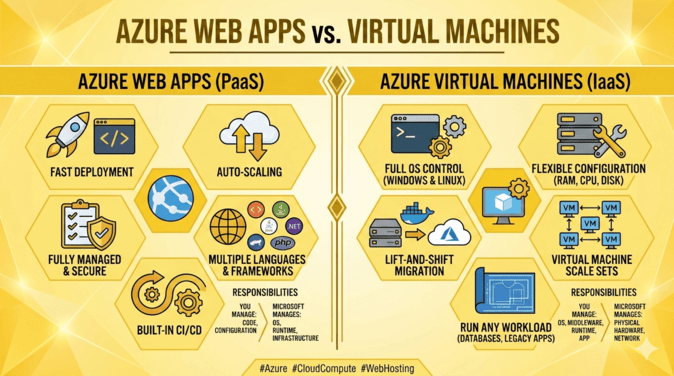
🖼️ Visualizing the Cloud Spectrum
In cloud computing, there is a direct trade-off between Control and Convenience.
1. Azure Virtual Machines (VMs): The IaaS Powerhouse 🏗️
Azure Virtual Machines represent Infrastructure-as-a-Service (IaaS). When you deploy a VM, you are essentially renting a slice of a physical server in a Microsoft data center.
The Level of Control
With a VM, you have “root” or “administrator” access. You choose the Operating System (Windows Server, Ubuntu, Red Hat, etc.), you manage the patches, you configure the firewall within the OS, and you install every dependency your app requires.
✅ When to Choose Virtual Machines
-
Legacy Applications: If you have an “old school” app that requires specific registry settings, COM+ components, or a very specific version of a background service that isn’t supported in a managed environment.
-
Custom Software Requirements: If your app needs to run specialized software in the background (like a custom print driver or a specific database engine) that a managed service won’t allow.
-
Complex Networking: If you need deep control over the network stack, such as installing custom VPN software or complex routing tables within the server itself.
-
Full OS Access: When your development team needs to log in via RDP or SSH to manually tweak configurations at the kernel level.
❌ The “Hidden” Costs of VMs
While the sticker price of a VM might look lower, the Total Cost of Ownership (TCO) is often higher. You must pay for the “human time” required to:
-
Patch the OS every month.
-
Configure backups and disaster recovery.
-
Manage antivirus and security monitoring.
-
Set up and test manual scaling logic.
💡 Actionable Link: Explore the Azure Virtual Machine Pricing Calculator to estimate your raw compute costs.
2. Azure Web Apps: The PaaS Speedster ⚡
Azure App Service (Web Apps) represents Platform-as-a-Service (PaaS). Here, Azure handles the underlying infrastructure, the operating system, and the web server (IIS or Kestrel/Nginx). You simply bring your code.
The Focus on Innovation
Web Apps are designed for developers. You can deploy code via GitHub, Bitbucket, or Azure DevOps with a few clicks. Azure handles the “plumbing”—scaling, security patching, and high availability—allowing your team to focus entirely on building features.
✅ When to Choose Azure Web Apps
-
Modern Web Applications: Perfect for .NET, Java, Node.js, Python, PHP, or Ruby applications.
-
Fast Time-to-Market: When you need to go from “code” to “live” in minutes without worrying about server hardening.
-
Automated Scaling: Web Apps can scale horizontally (adding more instances) or vertically (bigger instances) automatically based on CPU usage or a schedule.
-
Microservices and APIs: Ideal for hosting RESTful APIs or the front-end of a decoupled application.
-
Built-in DevOps: Features like “Deployment Slots” allow you to test code in a staging environment and swap it to production with zero downtime.
❌ The Limitations of Web Apps
-
No Root Access: You cannot log in to the OS. If your app requires a specific Windows update or a custom-installed background executable, it likely won’t work here.
-
Resource Limits: While powerful, you are operating within a “sandbox.” You are restricted by the limits of the App Service Plan you choose.
3. Direct Comparison: Feature by Feature 📊
| Feature | Azure Virtual Machines (IaaS) | Azure Web Apps (PaaS) |
| Management Effort | High (You manage the OS) | Low (Azure manages the OS) |
| Scalability | Manual or complex to configure | Native, automated, and easy |
| Deployment | Manual or via configuration tools | Native CI/CD (GitHub, DevOps) |
| Customization | Unlimited OS-level access | Restricted to application-level |
| Patching | You are responsible | Azure handles it automatically |
| Cost Model | Pay for the VM size (even if idle) | Pay for the App Service Plan |
| Best For | Legacy, custom OS needs, I.T. Pro control | Modern web apps, APIs, Dev-focused |
4. The 2026 Perspective: AI and Containerization 🤖
In 2026, the line between these two has blurred slightly due to Containers.
Web Apps for Containers
If your application is “too complex” for a standard Web App but you don’t want the headache of a VM, Azure Web App for Containers is the middle ground. You package your app and all its dependencies into a Docker container. Azure runs that container in a managed environment. You get the control of a custom environment with the convenience of a managed service.
AI Integration
Azure Web Apps now feature deep integration with Azure OpenAI. In 2026, many developers choose Web Apps because they offer “turn-key” connections to Managed Identities, allowing your web app to securely talk to AI models without storing passwords in your code—a process that is much more manual on a VM.
5. Cost Analysis: Saving Your Budget 💰
One of the biggest mistakes in Azure is choosing a VM because it “looks cheaper.”
-
The VM Trap: A
D2s_v5VM might cost $70/month. However, you also have to pay for the managed disk, backup storage, and the engineer’s salary to spend 3 hours a month patching it. -
The Web App Value: A “Premium v3” App Service Plan might cost $120/month. While the base price is higher, it includes automated backups, built-in security, and saves your engineers dozens of hours of maintenance.
Tip: Use Azure Advisor regardless of your choice. It will analyze your usage and tell you if your VM is oversized or if your Web App could be moved to a cheaper tier without losing performance.
💡 External Link: Learn about Azure Cost Management best practices.
6. Decision Matrix: Which One Should You Choose? 🎯
Still undecided? Use this quick decision logic:
-
Do you need to install custom software on the OS?
-
Yes → Virtual Machines
-
No → Go to Question 2
-
-
Is this a standard web app or API?
-
Yes → Azure Web Apps
-
No → Go to Question 3
-
-
Is the app “Containerized” (Docker)?
-
Yes → Azure Web Apps for Containers or Azure Container Apps
-
No → Virtual Machines
-
🏁 The Expert Verdict
For most modern businesses in 2026, Azure Web Apps is the superior choice. The agility, security, and integrated DevOps features far outweigh the raw control of a Virtual Machine for 90% of web-based workloads.
Virtual Machines should be reserved for legacy migrations where code cannot be easily refactored, or for specialized scenarios where you truly need to “own” the operating system.
Cloud success isn’t about having the most control; it’s about having the most velocity. By offloading the “boring” work of server management to Microsoft, you free your team to build the features that actually drive revenue.
Next Steps for You
Would you like me to create a step-by-step migration plan to move an existing website from a Virtual Machine to an Azure Web App? I can also generate a comparative cost table for specific instance sizes if you have a budget in mind. 🚀